
Mobile Settings
Overview
Section titled “Overview”Mobile Settings controls the connection and account context for the Android app. Use it when you need to change server URL, switch tenant, review app information, or sign out.
How it works
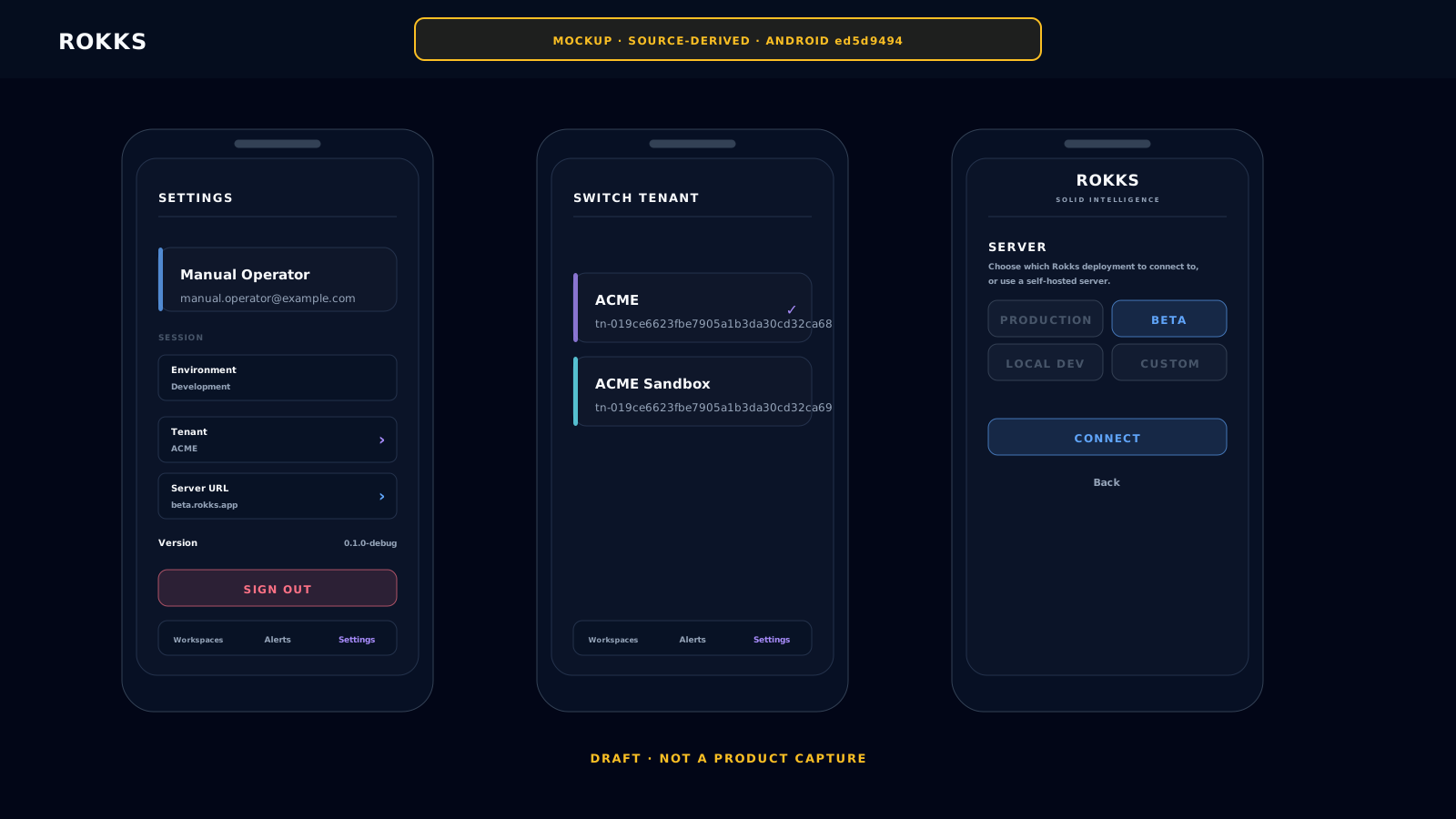
Section titled “How it works”The Android app stores the selected server URL separately from your token. Saving a different server URL clears the token and active scope, then requires a new sign-in. The current environment is shown for review; Change on the tenant row opens the tenant picker. The About section shows the app version.
Signing out clears the mobile token, active scope, dashboard-list cache, and rendered-dashboard cache on the device.
Step-by-step
Section titled “Step-by-step”- Open Settings from the bottom navigation.
- Review the signed-in account, environment, and tenant.
- Choose Change beside Tenant when you need another accessible tenant.
- Choose Edit beside Server URL only when your administrator tells you to move to another Rokks deployment; changing it signs you out.
- Review Version under About when support asks which app build you use.
- Choose Sign out to clear the current mobile session and dashboard caches.
Common mistakes
Section titled “Common mistakes”Do not change the server URL to troubleshoot a missing dashboard. Check environment and tenant first.
Do not share a signed-in device. Mobile access follows the identity and permissions of the person who signed in.