
Access Inventory
Overview
Section titled “Overview”Open Access Inventory in Administration to reach the API Policy page. It provides read-only inspection of the policy loaded by the deployment: API functions, deployed grant clauses, required scope, and declared object and row access constraints.
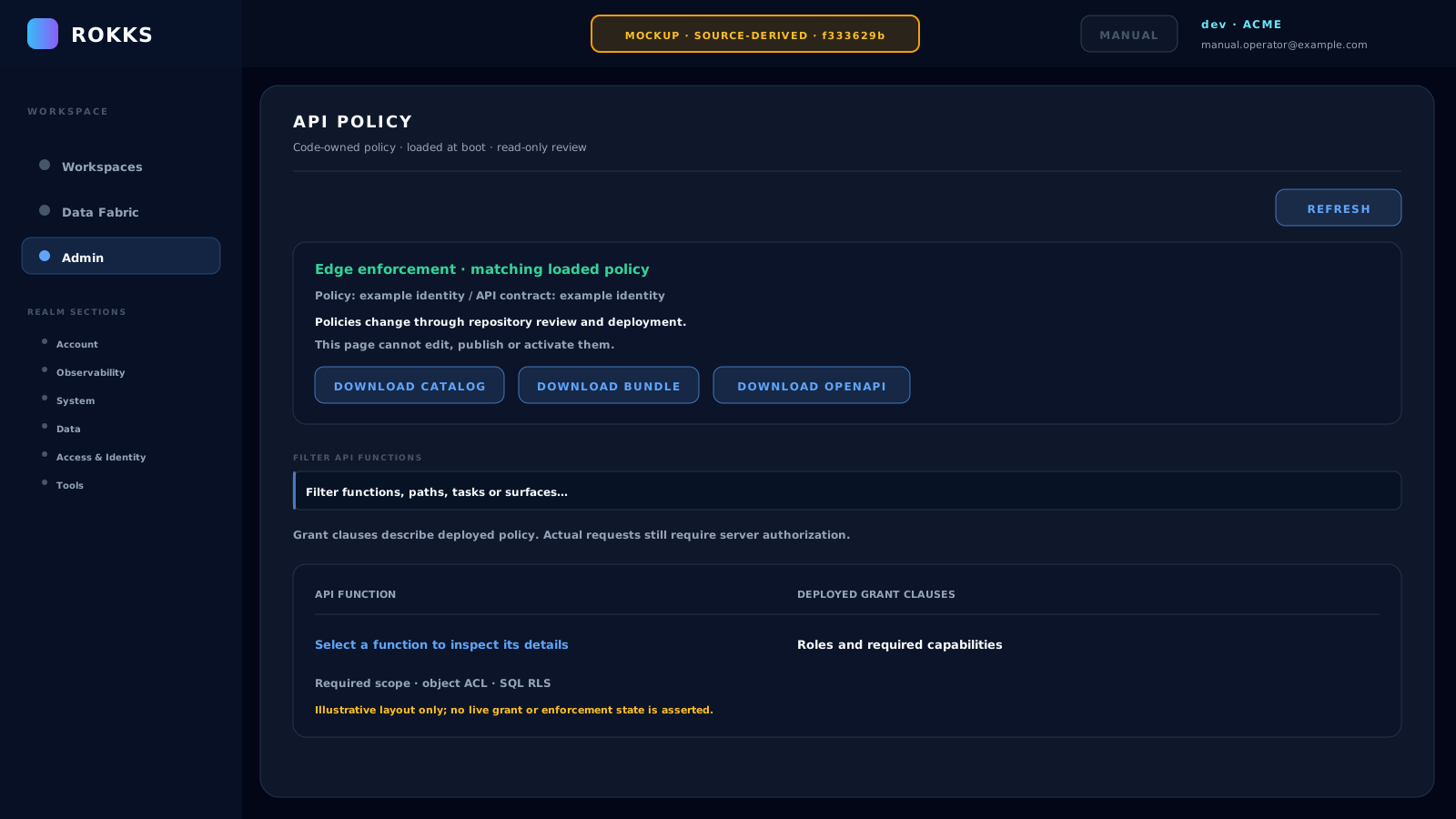
Policies change through repository review and deployment. This page cannot edit, publish or activate them. The instructions and illustration below describe the newer source baseline displayed beneath the illustration; they do not claim a new capture of the rest of the manual.
How it works
Section titled “How it works”The status card shows the loaded Policy identity and API contract identity. Edge enforcement · matching loaded policy means the page received an available policy whose identity matches the policy reported by Edge in enforcement mode. Policy / Edge identity unavailable or mismatched means that comparison has not succeeded; it is not confirmation that requests are permitted.
The function table has two columns:
- API function identifies an action and its HTTP method, service, and path.
- Deployed grant clauses shows the configured roles and required capabilities for that action. An unavailable grant remains labelled Unavailable.
Filter API functions narrows the displayed rows by action, operation, path, task, or surface. Selecting a function opens an inline explanation with its required environment and organization scope, declared object ACL and SQL RLS obligations, and the deployed grant, function, and operation details. Close dismisses that explanation.
The status card offers Download catalog, Download bundle, and Download openapi. These retrieve the operation catalog, deployed policy bundle, and public OpenAPI JSON respectively. Each request remains subject to its server-side access checks. A download exports information; it does not change or activate policy.
Step-by-step
Section titled “Step-by-step”- Open Admin, then Access Inventory. Confirm the page heading is API Policy.
- Read the status card and both policy identities. If loading fails or a mismatch appears, retain the reported error and identities for investigation.
- Click Refresh to reload the deployment’s policy information.
- Enter an action, path, task, or surface in Filter API functions to narrow the table. Clear the filter to restore all returned functions.
- Select a function. Read its deployed grant clauses, required scope, and declared object ACL and SQL RLS obligations. Use Close to dismiss the detail.
- If needed, select the appropriate download. Use Download openapi for the public API contract; treat the catalog and policy bundle according to their intended audience.
- Request a reviewed repository change and deployment when policy needs to change. There is no policy-authoring workflow on this page.
Common mistakes
Section titled “Common mistakes”Do not treat a displayed grant clause as a promise that your next request will succeed. Arbiter evaluates the actual request and scope; object ACL and SQL RLS still constrain data access.
Do not treat the filter or selected function as an access simulation. They change which information you inspect, not your roles, capabilities, or effective permissions.
Do not try to repair an unavailable or mismatched policy through an in-app approval or activation. Review the deployment and its policy identity. Application settings, identity assignments, object ACL, and SQL RLS configuration have their own controls; this page does not replace them.
Do not share a catalog or policy bundle outside its intended audience. Use the public OpenAPI download when a public contract is sufficient.