
Preferences
Overview
Section titled “Overview”The profile menu contains two different self-service pages:
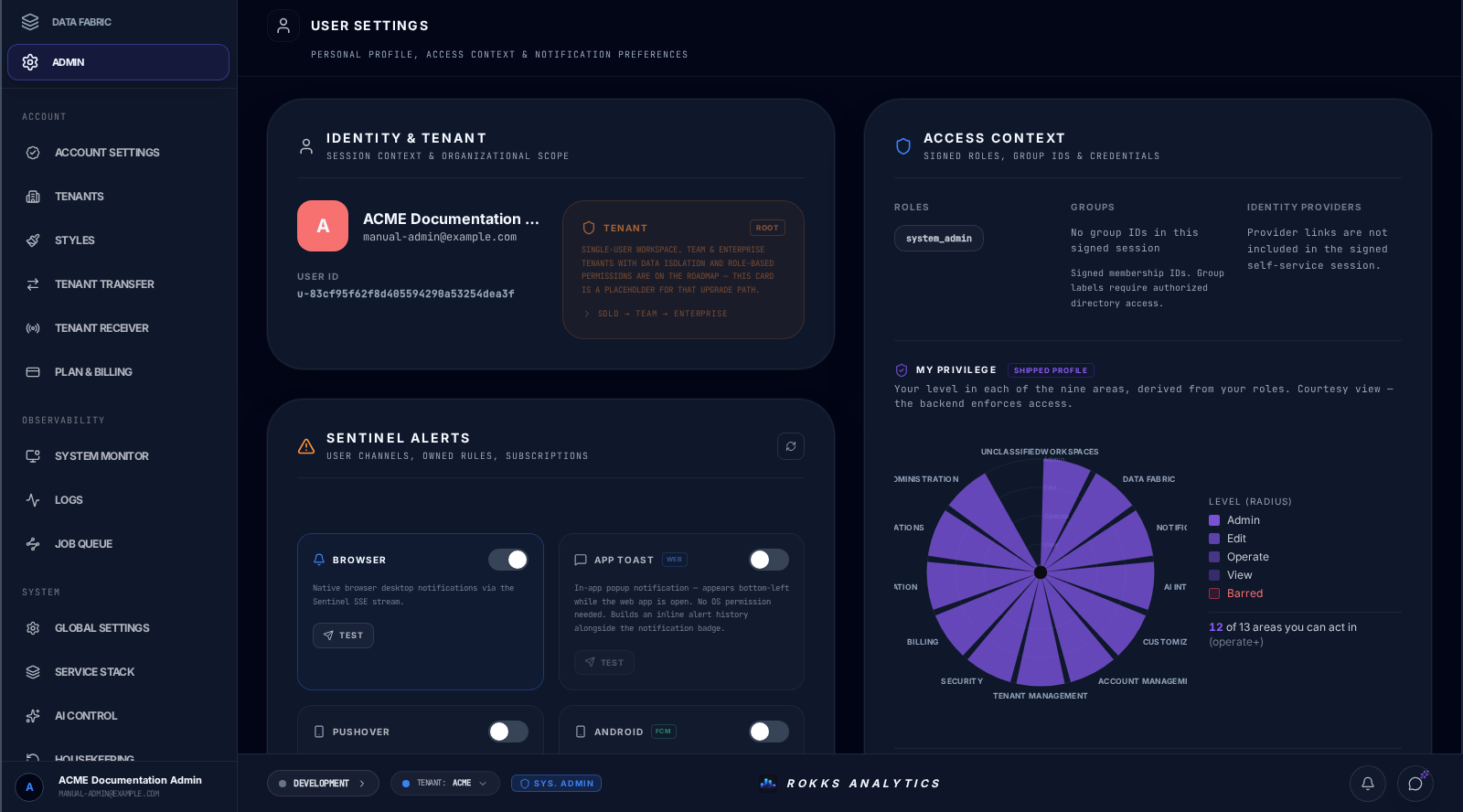
- User Settings shows the identity and access facts in your signed session and lets you manage your passkeys, personal API tokens, and Sentinel notification channels.
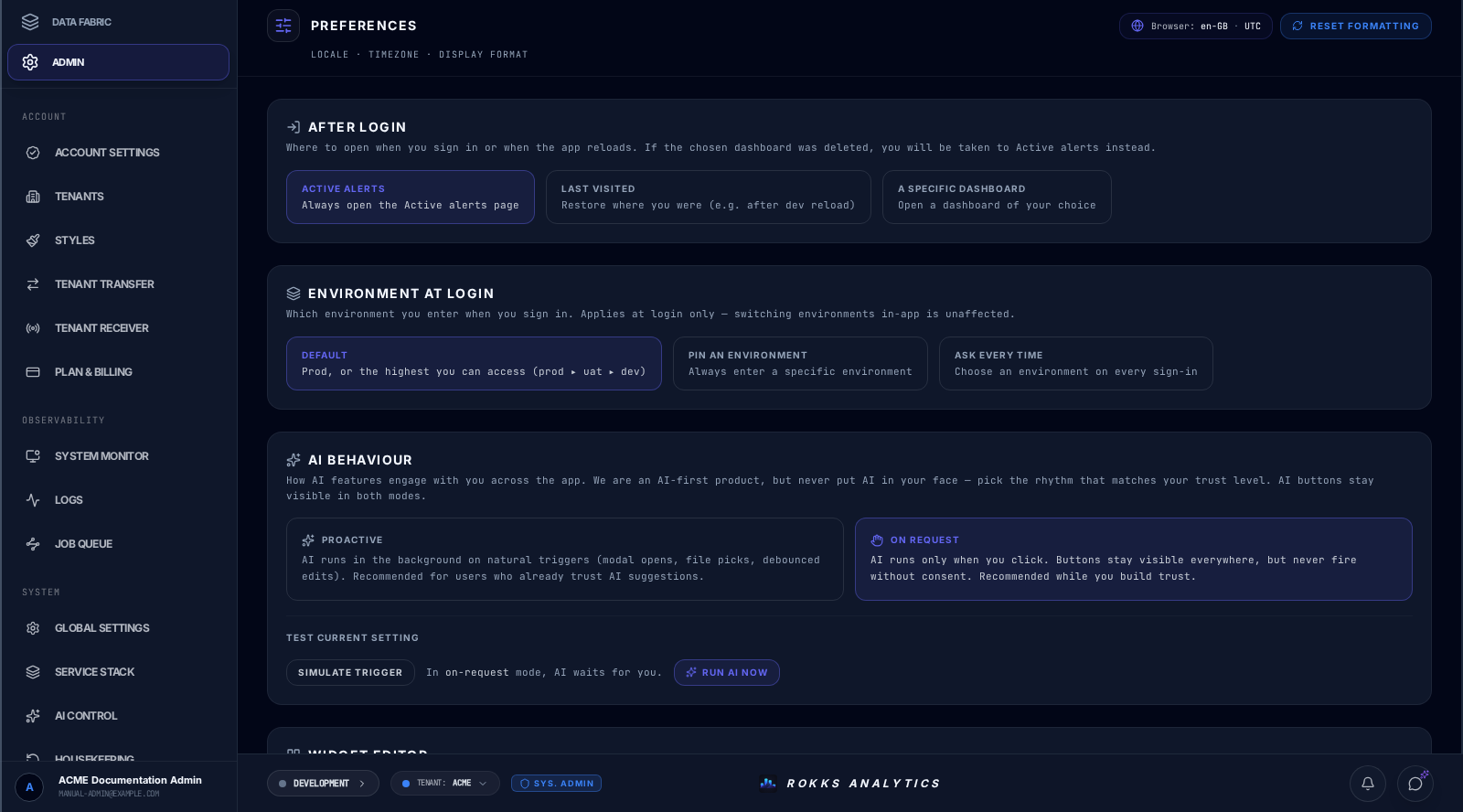
- Preferences controls where ROKKS opens after sign-in, which environment it selects, how AI and the Widget Editor engage, and how numbers and dates appear.
These pages affect your own account and experience. They do not grant roles, add group membership, or change a shared dashboard for other people.
How it works
Section titled “How it works”User Settings
Section titled “User Settings”Open User Settings to review the signed identity attached to the current session. Access Context lists every signed role and exact group ID, followed by My Privilege, passkeys, and personal API tokens. A group ID remains visible even when you are not allowed to open the administrator directory that resolves its display label. Linked identity-provider details are not included in this self-service session; the page says that explicitly instead of claiming that no providers exist.
Use Passkeys to add a phishing-resistant WebAuthn sign-in credential through the browser or operating-system prompt. ROKKS shows the Passkeys block only when the browser reports an available platform authenticator. The Device name field is a label for the credential; the authenticator decides whether the passkey stays local or synchronizes, so ROKKS does not promise that it is device-bound. Use API Tokens for command-line tools, scripts, and CI. A newly generated token is shown in plaintext once; copy it before leaving the amber reveal panel. The active-token list later shows only its prefix, last four characters, creation date, and last-used date. Revocation requires a second click on Confirm?.
The Sentinel Alerts card manages four personal delivery channels:
- Browser sends an operating-system notification after browser permission is granted.
- App Toast displays an in-app message.
- Pushover needs both a user key and app token before it can be tested.
- Android uses Firebase Cloud Messaging after the Android app has registered the device.
Each enabled channel has a Test action and reports its diagnostic steps inline. The same card lists alert rules you own under My Alerts and rules you follow under Subscribed Alerts.
Preferences
Section titled “Preferences”Open Preferences to configure:
- After login: Active alerts, Last visited, or a specific dashboard. If the selected dashboard no longer exists, ROKKS opens Active alerts.
- Environment at login: Default follows the sign-in authorization priority—prod, then uat, then dev—among environments that are enabled and permitted for your account. If none of those three is permitted, it uses the first other permitted environment. This resolver does not elect or store a default environment. You can instead pin an environment or choose Ask every time. The choice applies at sign-in; it does not prevent you from switching environments afterwards.
- AI behaviour: Proactive permits automatic AI work at natural triggers; On request waits for an explicit click. AI actions remain visible in both modes. Simulate trigger demonstrates the current choice without leaving the page.
- Widget editor: Auto-run on open immediately runs the saved query to populate its preview and field assignments; Manual run waits for you to select Run.
- Number & Date Format, Date Format, Timezone, and Clock format: choose explicit values or the browser-derived automatic values. Live Preview shows the effective result before you leave the page.
Changes apply immediately; there is no Save button. Reset formatting restores only the locale, timezone, date format, and clock format to their product defaults. It preserves the post-login destination, AI behaviour, Widget Editor and Workbench behaviour, Sidekick choices, and other non-formatting preferences. It also leaves the separately stored Environment at login choice unchanged. The control is unavailable without a selected tenant and shows Resetting formatting… while the save is in progress.
Step-by-step
Section titled “Step-by-step”Review access and credentials
Section titled “Review access and credentials”- Open the profile menu, then User Settings.
- Confirm that the name, email, user ID, roles, and group IDs match the account you intended to use.
- Read the My Privilege summary before attempting an administrative task.
- To add a passkey, enter a device name and select Add Passkey. Complete the browser or operating-system prompt.
- To create a personal API token, select Generate Token, enter a descriptive name, then select Create. Copy the plaintext token immediately and store it in the approved secret store; ROKKS will not show it again.
- To retire a token, select Revoke, then Confirm?.
- Enable only the notification channels you intend to use. Supply the required Pushover values or open the Android app once when those channels apply, then select Test and read every diagnostic step.
Choose personal behaviour and formatting
Section titled “Choose personal behaviour and formatting”- Open the profile menu, then Preferences.
- Choose the After login destination. Select an existing dashboard if you choose the dashboard option.
- Choose the Environment at login behavior. When pinning, select one of your available environments.
- Select Proactive or On request under AI behaviour, then use Simulate trigger to verify the difference.
- Choose whether the Widget editor should auto-run saved queries. Prefer Manual run for slow or expensive queries.
- Pick a locale, date format, timezone, and clock format. Check Live Preview for large and small numbers, percentages, dates, and timestamps.
- Return to the affected workflow and confirm the result. There is no separate save step.
Common mistakes
Section titled “Common mistakes”Do not use User Settings as an administrator directory. It describes the authority in your signed session; it does not resolve group labels or linked identity-provider records.
Do not navigate away before copying a newly generated API token. The plaintext is deliberately shown only once.
Do not enable Pushover without both required values, and do not expect Android tests to work before the app registers the device.
Do not confuse assistant engagement with feature access. On-request mode can still show AI buttons; it only changes when AI runs automatically.
Do not pin an environment or dashboard that you may lose access to without expecting fallback behavior. An unavailable pinned environment falls back through Default mode’s permitted-environment priority; a deleted post-login dashboard falls back to Active alerts.
Do not expect personal preferences to fix shared dashboard design. If every user needs a change, edit the dashboard or the appropriate platform setting.
Do not use Reset formatting as a preview or as a reset of all personal settings. It saves a reset of those four formatting fields; it does not change AI behaviour or your landing-page choice. Wait for the save to finish before making another change.